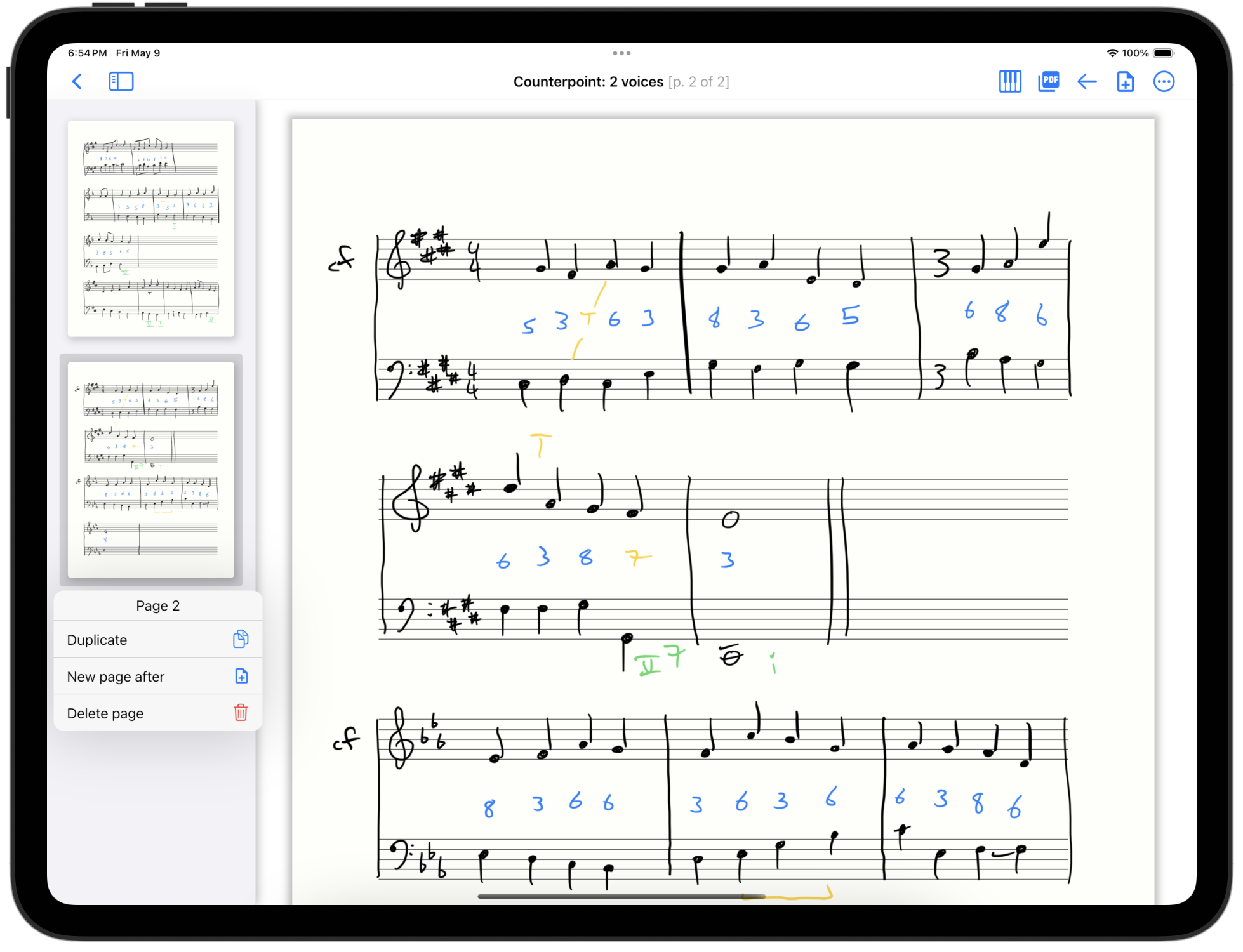
New pages sidebar!
We’ve released StaffPaper version 1.2.0, which adds a pages sidebar for page-level editing.
Scroll through all the pages in your document visually. Tap a page to change to it. Reorder pages by dragging after a long press.
| Interactions | |
|---|---|
| Tap active page | Show page action menu |
| Tap other page | Change to this page |
| Drag up/down | Scroll through pages |
| Long-press then drag | Reorder pages |
Tapping the already-active page opens a menu of page actions, which allows you to duplicate, delete or insert pages:
| Page menu actions | |
|---|---|
| Duplicate page | Inserts a duplicate of the current page. Useful for trying variations without rewriting. |
| Delete page | Delete a single page from a score. |
| Insert page after | Adds a blank page after this page. Useful to add pages in the middle of a score. |
Good luck using this, and as always, feel free to reach out with feedback!
This feature is the free verison of the app, but it is most useful in longer scores, so it is more relevant for the paid version.
Keep in mind
Deleting pages is intended for multi-page scores, and is not available for the last page in a score.
To delete the entire score, use the ellipsis (…) menu on the score selection page.